
Protect the people
who protect the numbers.
Practical cybersecurity guidance for bookkeepers, accounting professionals, and small firms handling sensitive client information. You don’t need an enterprise security budget to meaningfully reduce your risk.
Prepared for the Ask a CPA community by Latoya Stampley, CEO, Stampley Technology and Management
The six controls every bookkeeping firm should review first
Start at the top. Every item is free or nearly free, and each one closes a real attack path.
Click each number to see the detail.
-
1Turn on MFA+Email first — it is the reset key to everything else. Then banking, payroll, and every cloud tool that touches client data. An app or hardware key beats a text message.
-
2Move passwords into a password manager+One firm-wide vault with a unique password for every client and every tool — remembered by no one. Remove access the same day someone leaves.
-
3Switch on updates, encryption, and auto-lock+Automatic updates, disk encryption (BitLocker / FileVault), and auto-lock are already built into every device you work from — they just need to be switched on and verified.
-
4Keep client work browser-only in the cloud+Work inside QBO, Xero, or Google Drive instead of downloading files. Data that never lands on your laptop can’t be stolen from it — and the audit log records every action, by person.
-
5Verify bank-detail changes by phone+Any change to payment instructions or account details gets verified at a number you already had — every time, no exceptions. This one habit stops most payment-fraud scams targeting bookkeepers.
-
6Choose your incident-response contact today+Decide who you call in the first hour of a breach — before you need one under pressure. Help chosen in advance beats help googled mid-crisis.
“My interns work on my clients’ books
from their own computers.”
You can’t control their machines — so control these three things instead.
Control where the data lives
Browser-based cloud tools, individual user accounts, limited permissions, and audit logs. Client data never needs to touch an intern’s laptop.
Require a one-page BYOD baseline
Updates on, encryption on, auto-lock on, MFA, a password manager, and a separate work profile. Meet the baseline or no client files.
Train the scam reflex
Short, repeated phishing awareness specific to bookkeeping workflows — payment-change requests and urgent “client” emails. The call-back rule stops most losses.
“What apps and software
do I actually need?”
Fewer than you think. The specific brands matter far less than how each tool is configured — and most firms already own 80% of what they need.
Click each number to see the detail.
-
1A cloud accounting platform+Work in the browser, not in desktop files. Your clients’ books stay in one place with audit logs and per-user permissions — and each helper gets their own limited login.
-
2Business email with MFA+A business-grade account (Microsoft 365 or Google Workspace) — not a personal free account — with two-step verification switched on. Email is the reset key to everything else, so it comes first.
-
3A password manager+One firm-wide vault for client credentials, with a unique password for every client login you hold. A few dollars a month — the only item on this list that isn’t free.
-
4A secure client portal+Document requests and deliveries move through a portal instead of email attachments — tax documents should never travel as loose email attachments.
-
5A VPN for work away from home+Any time you or your team touch client data on public or shared Wi-Fi — a coffee shop, a client’s office, a co-working space — route it through a business VPN.
-
6Device security, built in+Updates, disk encryption, and auto-lock are already on your devices — they just need to be switched on and verified. Free, and they stop most opportunistic attacks.
The tools you already have, configured correctly, beat a shopping list of new tools every time. If you’re missing a piece — a password manager, a business VPN, business email — we license and manage those for our clients, or ask us and we’ll tell you honestly if you don’t need it.
The passkey question, answered
(and your tool questions too)
During the session I promised Nancy I’d verify how passkeys and PIN prompts fit together. Here’s the confirmed answer — plus responses to the questions that came through chat about hardware keys, QuickBooks, and password managers.
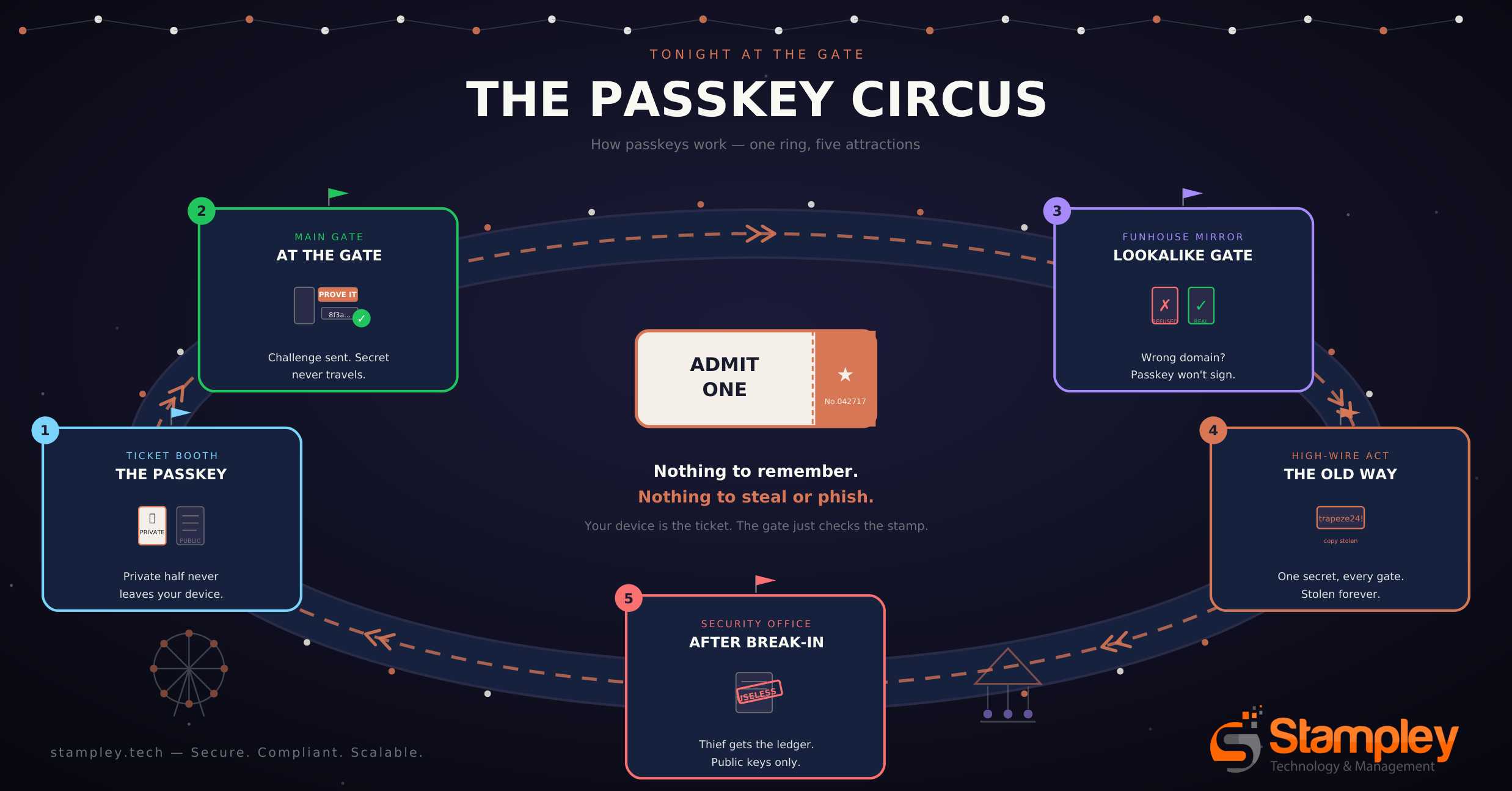
How a passkey handshake actually works
You unlock your device
Fingerprint, face, or the PIN you already use. This check happens entirely on your device — the website never sees it.
Your device signs the challenge
The site sends a random challenge; your device signs it with a private key that never leaves your device.
The site verifies the signature
The site checks the signature against the public key you registered. Nothing secret ever traveled — there’s nothing to intercept.
So is a PIN a passkey? Yes — when a passkey prompt asks for a PIN, that PIN is your device’s local unlock, the same one you type to wake your phone or laptop. It never travels to the website. The real authentication is the cryptographic signature your device produces after you unlock it. A password is a shared secret both you and the site know; a passkey is proof only your device can generate.
Where MFA fits: Know, Have, Are
Every authentication boils down to three kinds of proof. Multi-factor authentication simply means proving two different kinds — because a thief who steals one can’t fake the other.
Something you Know
A password or PIN. The weakest factor on its own — it can be guessed, phished, or stolen from another site’s breach. Never the only thing standing between a thief and client data.
Something you Have
Your phone with an authenticator app, or a hardware key like a YubiKey. Possession is hard to phish — a scammer on the other side of the world can’t tap your key.
Something you Are
A fingerprint or face scan. Fast, hard to steal, and checked on your device only. Combined with Have, it’s what makes a passkey so strong.
A password plus a text code is Know + Have. A passkey is Have + Are in a single step — your device (Have) unlocked by your face or fingerprint (Are) — with nothing phishable in between. That’s why we recommend passkeys wherever they’re offered.
YubiKey & hardware keys
A hardware key is the strongest second factor for your most critical accounts — email, banking, your password manager. Tap-and-go: nothing to type, nothing to intercept. Keep one as your “break-glass” login for the accounts that matter most.
QuickBooks
Browser-based cloud accounting is the right model: per-user logins, limited permissions, and an audit trail. Give every helper their own login with the least access they need — and never share credentials.
1Password or LastPass?
Any dedicated password manager beats browser-stored passwords. If you’re choosing today, 1Password or Keeper are where most firms land — much of the bookkeeping community moved from LastPass after its 2022–2023 breach disclosures. If you’re on LastPass today, plan a calm, scheduled migration rather than a panic.
Where to get what you need
We license, configure, and manage these for our clients — or point you to the right option if you don’t need ours.
- Business VPN (NordLayer)For anyone touching client data on public or shared Wi-FiView options →
- Password manager (Keeper)One firm-wide vault for every client credential you holdView options →
- Business email with MFA (Microsoft 365)The reset key to everything else — secure it firstView options →
- Email authentication (SPF / DKIM / DMARC)Stop spoofed senders at the door — free step-by-step setup guideRead the guide →
- End-to-end device protectionUpdates, encryption, and auto-lock — verified and managed for youExplore services →
Not sure which you actually need? Schedule a consultation and we’ll help you choose — honestly, including telling you what you don’t need.
Limited to 20 member firms
Free cybersecurity risk assessment review
Complete a short self-assessment about how your firm handles email security, passwords, devices, client data, and payment changes. You’ll receive a written review with your top risks and a prioritized list of practical fixes.
Self-assessment
A short questionnaire mapped to the six controls. Complete it on your own time — no calendar required.
Written review
A one-page prioritized summary: what’s solid, what’s exposed, and your two highest-risk gaps with specific steps to close them.
20-minute walkthrough
If you want it, a short call to walk through your findings. Most firms find the written review is enough.
Takes about 10 minutes to complete · Written review within 5 business days · Limited to 20 Ask a CPA member firms
A good fit — or an honest no
This is a good fit if you:
- Operate a bookkeeping, accounting, or virtual finance practice.
- Give employees, interns, or contractors access to client systems.
- Handle payroll records, tax documents, bank information, or PII.
- Want a practical starting point, not an enterprise security program.
- Need help turning good intentions into documented workflows.
This may not be the right fit if you:
- Need emergency breach response right now.
- Are looking for legal advice or a formal compliance opinion.
- Want a fully managed IT environment immediately.
- Need a vendor to make decisions without your team’s involvement.
Claim one of the 20 review slots
Tell us a little about your practice. We’ll send the short self-assessment within 1 business day and your written review within 5 business days of receiving it.
Your information is used only to deliver your review — never sold, never added to a marketing list. See our privacy policy. Limited to 20 Ask a CPA member firms.
Practical cybersecurity for organizations that can’t afford a preventable mistake.
Stampley Technology and Management helps organizations protect sensitive information, improve cybersecurity, meet compliance requirements, and use technology as a strategic business advantage.
Latoya Stampley
CEO, Stampley Technology and Management
LStampley@stampleytech.com
stampleytech.com