


You’re at a coffee shop in the Loop, waiting on a delayed flight at O’Hare, or squeezing in work between client meetings. Your laptop needs internet, and you have two options: connect to the free Wi-Fi with a VPN running, or skip the coffee shop network entirely and tether to your phone’s mobile hotspot without a VPN.
It’s a question we hear often from the healthcare practices, law firms, and small businesses we work with here in Chicago, and it deserves a real answer, not a shrug. Both options are far better than connecting to public Wi-Fi with no protection at all. But when your work involves patient records, client files, or confidential business data, “better than nothing” isn’t the standard you should be aiming for. Before we crown a winner, we need to be honest about what free Wi-Fi actually exposes, what each option really does, and where mobile VPNs get complicated. Let’s break it all down.
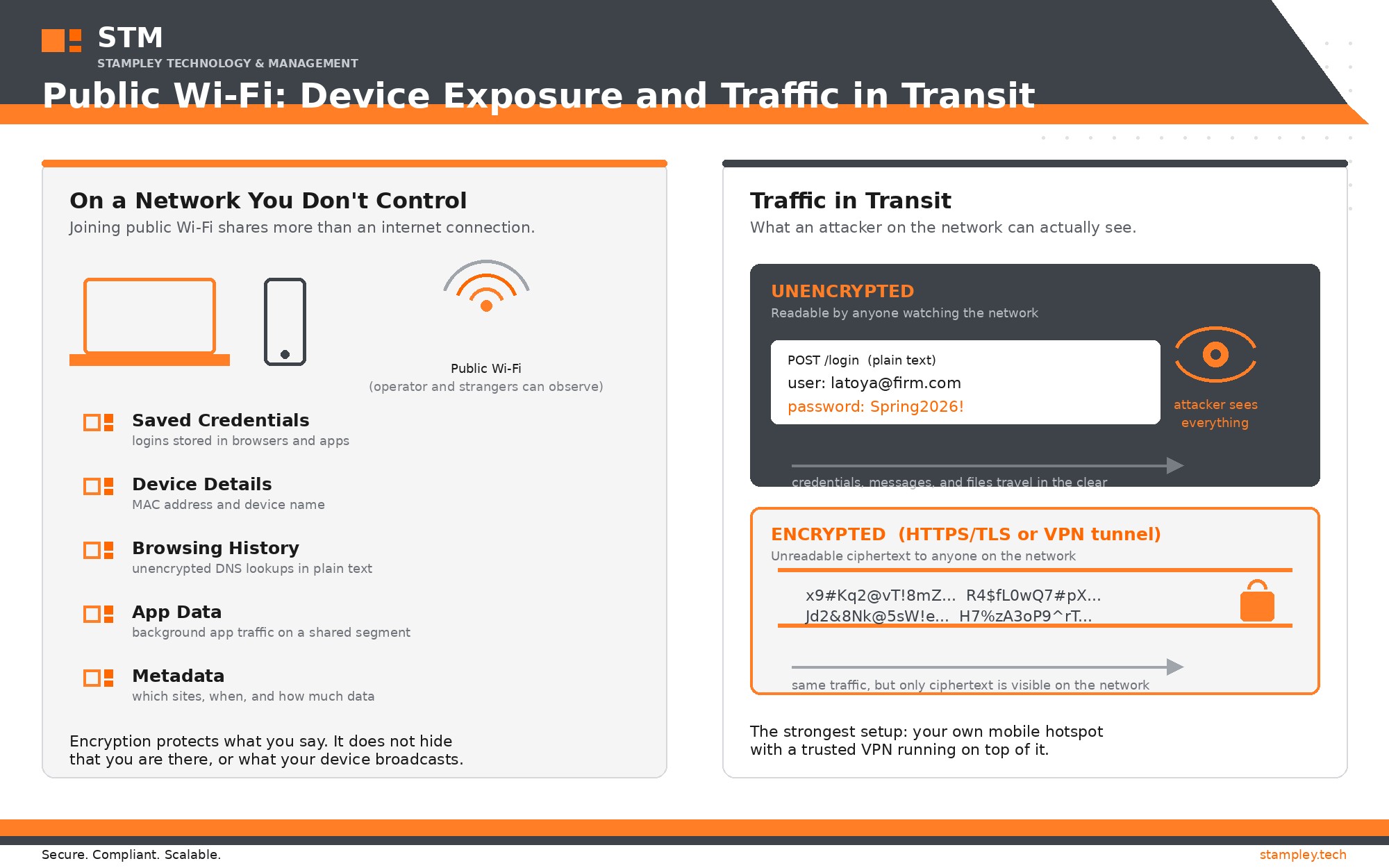
Infographic: What your device exposes on public Wi-Fi, and how encrypted versus unencrypted traffic travels.
What Each Option Actually Does
Before we can compare them fairly, it helps to understand what’s happening under the hood. The two options protect your data in very different ways.
How a VPN Works on Free Wi-Fi
When you connect to free public Wi-Fi, whether at a café, airport, hotel, or conference center, you’re joining a network you don’t control and can’t verify. Other people on that same network, and potentially whoever manages it, may be able to observe details about your connection.
A VPN (virtual private network) creates an encrypted tunnel between your device and the VPN provider’s server. Your internet traffic travels through that tunnel, so anyone watching the local network sees only encrypted data heading to your VPN provider, not the websites you visit, the credentials you enter, or the files you transfer.
In other words, a VPN doesn’t make public Wi-Fi safe. It makes your traffic unreadable to anyone on that network. That’s a meaningful and important distinction, and as we’ll see next, it’s not the whole picture.
How Your Phone’s Hotspot Works
Your mobile hotspot takes a different approach: instead of joining someone else’s network, you create your own. Your laptop connects directly to your phone over an encrypted Wi-Fi connection (protected with WPA2 or WPA3, depending on your device), and your phone then routes that traffic over the cellular network.
That means every step of the journey, from laptop to phone and phone to cell tower, runs over connections that are encrypted by default and that you control. You’re not sharing the network with strangers, and you’re not trusting infrastructure you can’t inspect.
What Free Wi-Fi Exposes About Your Device, Even When Your Messages Are Encrypted
Here’s the part of the conversation most comparisons skip. Even if every message you send is encrypted end to end, the simple act of joining a free network shares information about you and your device, and creates risks that encryption alone cannot fix.
- Your device’s identity. The network sees your device’s MAC address (a hardware identifier, unless your operating system randomizes it) and often your device’s name, which can be something as identifying as “Latoya’s MacBook.” Anyone monitoring the network can log when your device joins, how long it stays, and which access points it connects through. Repeated over time, that pattern becomes a location trail.
- Your traffic metadata. Encryption protects the contents of your communication. It does not hide the fact that communication is happening. The network can still see which domains you connect to, when, how often, and how much data flows. Someone watching learns that you visited a hospital’s patient portal at 2:15 in the afternoon, even if they can’t see what you did there.
- Your DNS lookups. Unless your device uses encrypted DNS, every website address you request is visible in plain text to the network operator before any encryption kicks in. That browsing history is exactly what many “free” networks are quietly collecting in exchange for access.
- Captive portal sign-ins. Many free networks require an email address or name on a sign-in page before you can connect. That information is routinely used for marketing, and the page itself is operated by whoever controls the network, with no way for you to verify what else it’s doing.
- Direct exposure to everyone else on the network. Public Wi-Fi places your laptop on the same local network as every stranger in the room. Depending on your sharing settings, that can expose file sharing, printer services, and open ports to probing. Attackers on shared networks have long used techniques like evil twin hotspots (fake networks that mimic legitimate ones), ARP spoofing to position themselves between you and the internet, and session hijacking against any traffic that isn’t encrypted.
The takeaway: encryption protects what you say. It does not fully protect the fact that you are there, what your device broadcasts about itself, or the doors your device leaves open on a shared network. That’s a real gap, and it’s one of the strongest arguments for avoiding the shared network entirely.
Why Your Own Hotspot Usually Wins
So which is better: VPN on free Wi-Fi, or no VPN on your hotspot? In most everyday scenarios, your own mobile hotspot is the safer choice. Here’s why.
You Control the Network
Security professionals have a saying: never trust a network you don’t control. With a hotspot, the network is yours. You set the password, you decide who joins, and the connection between your laptop and phone is encrypted from the moment it’s established. With public Wi-Fi, you’re placing trust in whoever set up that network, and in some cases, in a network that’s been spoofed to look legitimate.
You Avoid the Exposure Entirely
Remember everything free Wi-Fi sees about your device: your MAC address, your metadata, your DNS requests, your captive portal sign-in. Your hotspot sidesteps all of it. Your device never appears on a network shared with strangers, never broadcasts its identity to an unknown operator, and never sits on the same local segment as an attacker scanning for open ports.
Fewer Links That Can Fail
A VPN on public Wi-Fi stacks multiple layers: the VPN tunnel, the VPN provider’s infrastructure, and the public network itself. Each layer adds protection, but each also adds something that can be configured poorly, interrupted, or quietly fail. A hotspot is a simpler, shorter path with fewer moving parts, and simplicity is a genuine security advantage.
No Dependence on VPN Quality
Not all VPNs are created equal. A reputable, business-grade VPN does exactly what it promises. But free or unknown VPN apps have a mixed track record: some log more data than they protect, and a few have been caught selling user activity. If the VPN itself is the weak link, you’ve added a false sense of security rather than real protection. Your hotspot doesn’t depend on any third party’s honesty.
Cellular Networks Are Encrypted by Design
Modern cellular traffic is encrypted between your phone and the carrier’s tower as a standard feature. You’re not relying on an add-on tool for that baseline protection; it’s built into how the network operates.
When a VPN on Free Wi-Fi Still Makes Sense
None of this means VPNs on public Wi-Fi are a bad idea. There are real situations where it’s the practical choice:
- Limited mobile data. If you’re on a tight data plan and need to download a large file or join a long video call, public Wi-Fi with a trusted VPN can be the economical option.
- Weak or no cellular coverage. In some buildings, basements, and rural areas, cellular signal is unreliable while Wi-Fi works fine.
- Multiple people need access. If your team is traveling together and one person’s hotspot can’t support everyone, a VPN-protected shared connection may be the workable fallback.
- Slow hotspot performance. Some carriers throttle tethered connections. If your hotspot speed makes work impossible, a VPN on Wi-Fi keeps you productive with reasonable protection.
The key word in all of these scenarios is trusted. A reputable business VPN, the kind STM provisions and manages for clients, provides strong, verifiable protection. A random free VPN app does not.
The Complications of Running a VPN on Mobile Devices
If the VPN side of this comparison has a weakness, it’s that VPNs on phones and tablets come with real-world friction. Knowing these complications helps you set expectations and configure devices the right way.
- App and operating system restrictions. Mobile operating systems limit what VPN apps can do. Features like always-on VPN, which reconnects automatically and blocks all traffic if the tunnel drops, typically require a configuration profile or mobile device management (MDM) to enforce. A VPN app someone installed manually usually won’t behave this way on its own, which means protection quietly ends the first time the tunnel drops or the phone restarts.
- Split tunneling surprises. Some VPNs route only part of your traffic through the tunnel. On mobile devices, certain apps or system services may bypass the VPN entirely with no obvious indicator. You can believe you’re protected while some of your traffic is traveling in the clear.
- Battery and performance drain. Keeping an encrypted tunnel running all day is one of the heavier drains on a phone battery, and it can noticeably slow connections. In practice, people switch their VPN off to save power, which defeats the purpose.
- Captive portal conflicts. On networks that require a sign-in page, the VPN often blocks that portal from loading. The standard workaround is to disconnect the VPN, sign in, and reconnect afterward. That routine creates a window where your traffic flows unprotected across the public network, and it’s exactly when many people get distracted and forget to reconnect.
- Apps that block VPN traffic. Some banking, streaming, and corporate apps detect and reject VPN connections. Users respond by toggling the VPN off for those apps, once again opening unprotected gaps.
- Free VPN apps are a bigger risk on mobile. A shady VPN app on your phone isn’t just mishandling your browsing. Mobile apps can request permissions that expose your contacts, photos, and location. On a phone, a bad VPN app can be a worse privacy problem than no VPN at all.
None of these complications make mobile VPNs a bad idea. They make unmanaged mobile VPNs a bad idea. When VPNs are provisioned and configured properly, with always-on enforcement and a kill switch, most of these gaps disappear. That configuration work is exactly what a managed security provider should be doing for your team.
The Real Answer: Why Not Both?
Here’s the part most comparison articles skip: this isn’t actually an either/or decision. The strongest setup is your mobile hotspot with your VPN running on top of it.
When you combine the two, you get a network you control and an encrypted tunnel over that network. Your traffic is protected at every hop, your location and activity are shielded even from your cellular carrier’s view, and you’ve eliminated the public network from the equation entirely. For organizations handling regulated data, including protected health information, privileged legal communications, and confidential client records, this layered approach is the standard we recommend.
Think of it like securing a building. Your hotspot is a solid locked door. A VPN is a security guard inside. Either one alone is good. Both together is how you protect the things that genuinely matter.
What This Means If You Handle Regulated Data
If your organization operates under HIPAA, attorney-client confidentiality requirements, or state data protection rules, the stakes of this question go beyond personal convenience.
- Healthcare practices: Checking email or your EHR from a café? Patient data deserves the controlled-network-plus-VPN approach, not a best guess on an open network.
- Legal firms: Privileged communications are only as protected as the weakest connection they travel over. A hotspot keeps client matters off networks you can’t vouch for.
- Nonprofits and schools: Donor records, family contact information, and grant-related documents all carry obligations. The same layered approach applies.
The good news: building these habits isn’t complicated. It’s a matter of knowing your options and making the better one your default.
A Simple Decision Guide for Your Next Remote Work Session
When you’re away from the office and need to get online, run through this quick checklist:
- Working with sensitive or regulated data? Use your hotspot with your VPN enabled. Full stop.
- General browsing, news, or non-sensitive research? Either option is fine, though the hotspot is still the better habit.
- Big downloads or long calls on a limited data plan? A trusted VPN on public Wi-Fi is acceptable; avoid entering credentials on sites you don’t need to.
- No cellular signal? Use your trusted VPN on the available Wi-Fi, and save sensitive tasks until you’re on a better connection.
- Never: Connect to public Wi-Fi without a VPN for anything involving logins, client data, or financial information.
One more habit worth adopting: verify the exact name of any public Wi-Fi network with staff before connecting. Networks that mimic legitimate hotspots remain one of the simplest tricks in an attacker’s playbook, and a VPN can’t help you if you’ve already connected to a network designed to deceive.
Resources to Explore Further
Want to go deeper? The following resources provide practical guidance and technical background from government agencies, standards organizations, and major device platforms.
- Public Wi-Fi risks and safe use: Read the CISA guide to securing wireless networks, the FTC’s public Wi-Fi guidance, and the NSA recommendations for wireless devices in public settings.
- VPN fundamentals and hardening: Review CISA and NSA guidance on selecting and hardening VPNs and NIST’s Guide to IPsec VPNs.
- DNS and what network observers can see: Explore NIST’s Secure Domain Name System Deployment Guide and CISA’s encrypted DNS implementation guidance.
- Mobile and cellular security: Read CISA’s mobile communications best-practice guidance and the NSA’s public-setting wireless device recommendations.
- Device encryption and platform security: Apple’s Encryption and Data Protection Overview explains how device-level protection works and where it fits into a broader security strategy.
- Modern access security: For a broader look at the limits of traditional VPN models and newer approaches, see CISA’s guidance on modern approaches to network access security.
Make the Secure Choice Your Default
The best security decision is the one you don’t have to think about twice. When your team knows that the hotspot-plus-VPN combination is the default for remote work, and when that VPN is a reputable, business-grade service that’s properly configured with always-on protection, you’ve removed the guesswork from every coffee shop, airport, and hotel lobby your team works from.
That’s exactly what we help organizations build at Stampley Technology & Management. From business VPN licensing to the policies, device configuration, and training that make secure habits stick, we tailor remote work security to how your organization actually operates, whether you’re a healthcare practice in Chicago, a legal firm in the suburbs, or a growing nonprofit serving your community.
Ready to make remote work security simple for your team? Schedule a consultation or explore our services to see how we can strengthen how your organization works from anywhere, with confidence.
Leave a Reply